A considered way to shop. Discover · Compare · Choose
The shop directory ↗
Home›More products›DataVideo TP-300 MARK II
DataVideo TP-300 MARK II
A LITTLE COMPARISON GOES A LONG WAY

DataVideo TP-300 MARK II

Explore DataVideo →
LOWEST LISTED PRODUCT PRICE
£372.06

at PCHUB.UK · 1 shop

Listed delivery: £0.00 · Total £372.06

Visit best offer Affiliate link · Buy directly from the retailer
Compare all 1 offers ↓

Price data received 19 Nov 2026 14:14

COMPARE BEFORE YOU CHOOSE

Prices & shops

1 shop

Sorted by product price. Delivery is shown separately and may depend on your address, delivery method and basket.

PCHUB.UKLowest product price · Availability not suppliedListed delivery: £0.00 · Total £372.06Price data received 19 Nov 2026 14:14
£372.06
View offer ↗
We show offers from partner shops. Confirm the final price and availability with the retailer before ordering.

THE FINER DETAILS

Product details

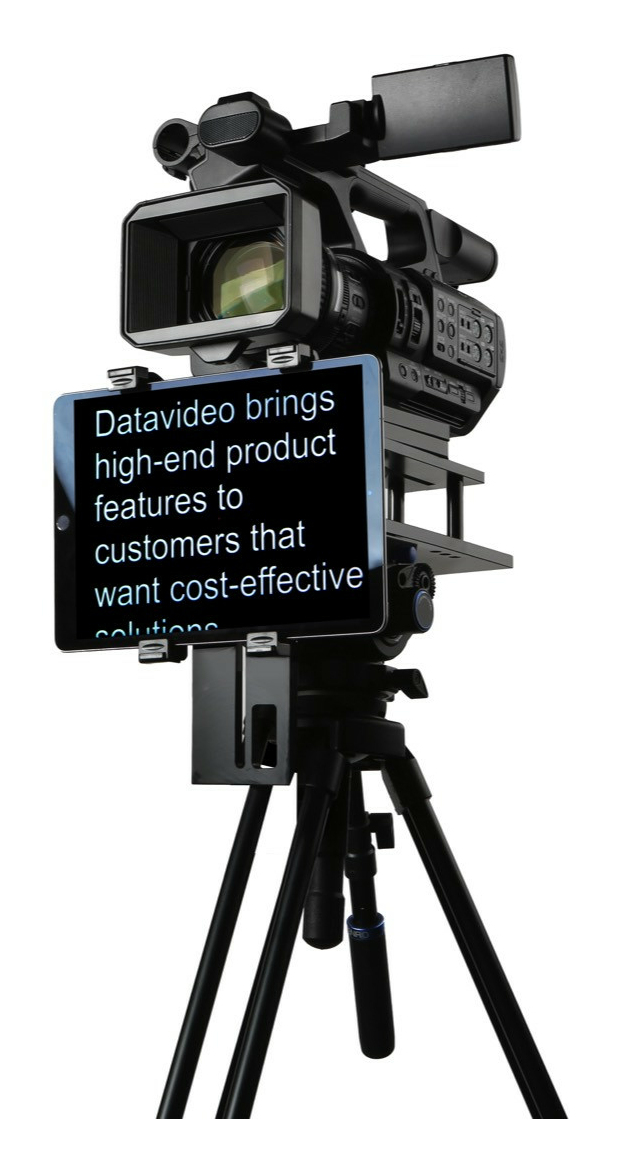
Easy to Use Tablet TeleprompterWhy struggle with expensive re-takes. on stage talent drifting off script or a presenters’ loss of eye contact with the viewing audience? This Datavideo Prompter Kit is designed to help you overcome these problems by converting a tablet computer (not supplied) into a low cost and effective prompter.The Datavideo Prompter Kit. TP-300 MARK II. can be used in either a theatre setting. or a video studio. Professional Teleprompting Made EasyHardware built to withstand the demanding conditions of professional shoots and software with high end features. our teleprompters are designed to be simple and straight forward to operate by the talent or remote operator. We use a high-quality mirror glass with a low iron content. meaning that the mirror has no tint.Suitable for Tablets up to 11.6''The TP-300 MARK II is designed to convert a small tablet computer into a low cost and effective prompter. The teleprompter houses any tablet with a minimum width of 110mm and maximum of 210mm measured in portrait orientation. A regular 10" iPad or Android alternative works best.High-Quality Beam SplitterThe TP-300 Teleprompter adopts a high-quality 60/40 beam splitter.60/40 beam splitter" refers to 60% of the light passes through the beam splitter. allowing the camera to capture the subject; 40% of the incident light is reflected towards the talent or speaker who is reading the teleprompter.The 60/40 ratio strikes an optimal balance. allowing the reflected text from the teleprompter to be vivid and readable. while also allowing the camera to capture high-quality. well-exposed footage.Normal Tripod SetupPlace a sheet of beam splitter glass at a 45-degree angle in front of the camera lens. Secure the tablet below the camera lens. ensuring that the text on the screen reflects onto the beam splitter glass and appears in the camera's line of sight.Below Lens SetupThere is an alternatives method to set up the TP-300 MARK II without using the traditional beam splitter glass. User can have a tablet or a talent monitor directly face toward the on talent. So the speaker can read the scrolling text on the tablet or screen while maintaining eye contact with the camera.Datavideo TP-300 MARK II is generally smaller and lighter than professional studio teleprompters. making it more manageable for transportation. TP-300 MARK II comes with a carrying case for convenient transportation. The teleprompter is often designed to be compatible with standard tripods. further enhancing its portability for on-location shoots.Portable and Suitable for Various ApplicationsThe TP-300 MARK II Teleprompter is suitable for various applications. Its adaptable design makes it an ideal choice for various uses. Typical applications include Professional Video Production. Speech Delivery. Interviews. Educational Videos. Live Broadcasting. Online Content Creation and more.Whether you are producing professional video content. delivering speeches. or conducting interviews. the TP-300 MARK II Teleprompter excels in providing clear and readable prompts for seamless and confident presentations. Optional Bluetooth and wired remote controlThe WR-500 can be used to control our powerful dvPrompter Plus app in Wired or Bluetooth modes. The controller allows you to pause and resume the scroll. increase and decrease speed. increase and decrease font size. jump to specific points within the script (break markers) and switch between scripts in the playlist.dv Prompter Plus is a powerful teleprompter scripting application suitable for Apple and Android devices.dvPrompter Plus : Flexible control optionsdvPrompter Plus supports direct talent led control via our WR-500 Wired/Bluetooth remote control or remote control via IP using any web browser. Both options allow you to pause and resume the scroll. increase and decrease speed. increase and decrease font size. jump to specific points within the script (break markers) and switch between scripts in the playlist. Optionally you can connect the Contour Shuttle Xpress to the IP connected computer for even more subtle control.dvPrompter Plus: Remote monitoring via WiFi or EthernetControl and monitor the prompter over a local network using any device with a modern web browser.dv Prompter Plus : Powerful rich text editorYou can remotely change the font size. type. colour and justification on a per script basis and even use multiple different fonts within a single script. The editor also has support for embedding images and creating playlists from multiple scripts.dv Prompter Plus: Synchronize multiple tablets via IPConnect multiple teleprompters together using our unique IP synchronisation over Ethernet or WiFi. Supports PowerPoint and Keynote slidesIn addition to text-based scripts you can now import your Powerpoint or Keynote presentation slides via the web interface. slides can be controlled using the hardware WR-500 control or the web based remote control interface. dvPrompter Plus
Language
en_GB